SPOTIFY HOME EXPLORATIONS
PROJECT TIMELINE
6 Weeks
TOOLS
Figma & Survey Monkey

Spotify, is a leading global audio streaming service which provides music, podcasts, and audiobooks. It has been my primary platform for listening and sharing audio for 8 years.
In this project, I assess the Home's current state and suggest interactions that might assist in enhancing user personalization, and spotlight awesome features to the Home.
HOME SWEET HOME
Figure 1.0 - Spotify Home - filled with content for me. Alot of Podcasts, and generated music playlists aimed to please my ears
A user’s Spotify Home is filled with a myriad of content. All of which takes the common “Cards” or “Carousel” UI patterns we see in most streaming services.
However, I felt there were a few things missing from the experience, and took to the internet to investigate.
LACK OF FEATURE SPOTLIGHT AND PERSONALIZATION
I conducted in person interviews with my friends & sent a short survey to a few Spotify Reddit communities for some data. I looked at community requests, and online publications about the service to discover the following throughlines about the Home experience:
Users have no way to personalize their Home with specific Content Types or Aesthetics
Users want direct access to Spotify’s cool features in their Home
Figure 1.1 - Responses to “What would you like to Remove from your Spotify Home?”
1 - PERSONALIZATION
Users who only prefer Music often felt they were being forced to see anything related to Podcasts or Audiobooks. Even if you are a Premium subscriber, you still have no control over your Home recommendations or layout.
2 - FEATURES
Unlike most streaming services, Spotify provides specific listening and discovery features:
Discover Weekly, Live Events, Merch, DJ Beta, Custom Playlists, Jams and its API is public, allowing any user to create external tools, like the very cool Forgotify.
Even though the above Features are great, these features are not front and center on the Home, nor on all devices. Providing quicker access might assist with engagement and I set out to explore ways to promote these features.
EXPLORATION 1 - “LIVE EVENTS”
Live Events are something I personally seek out regularly as did the users I surveyed. So I reduced getting to live events by a step by making it more prominent.
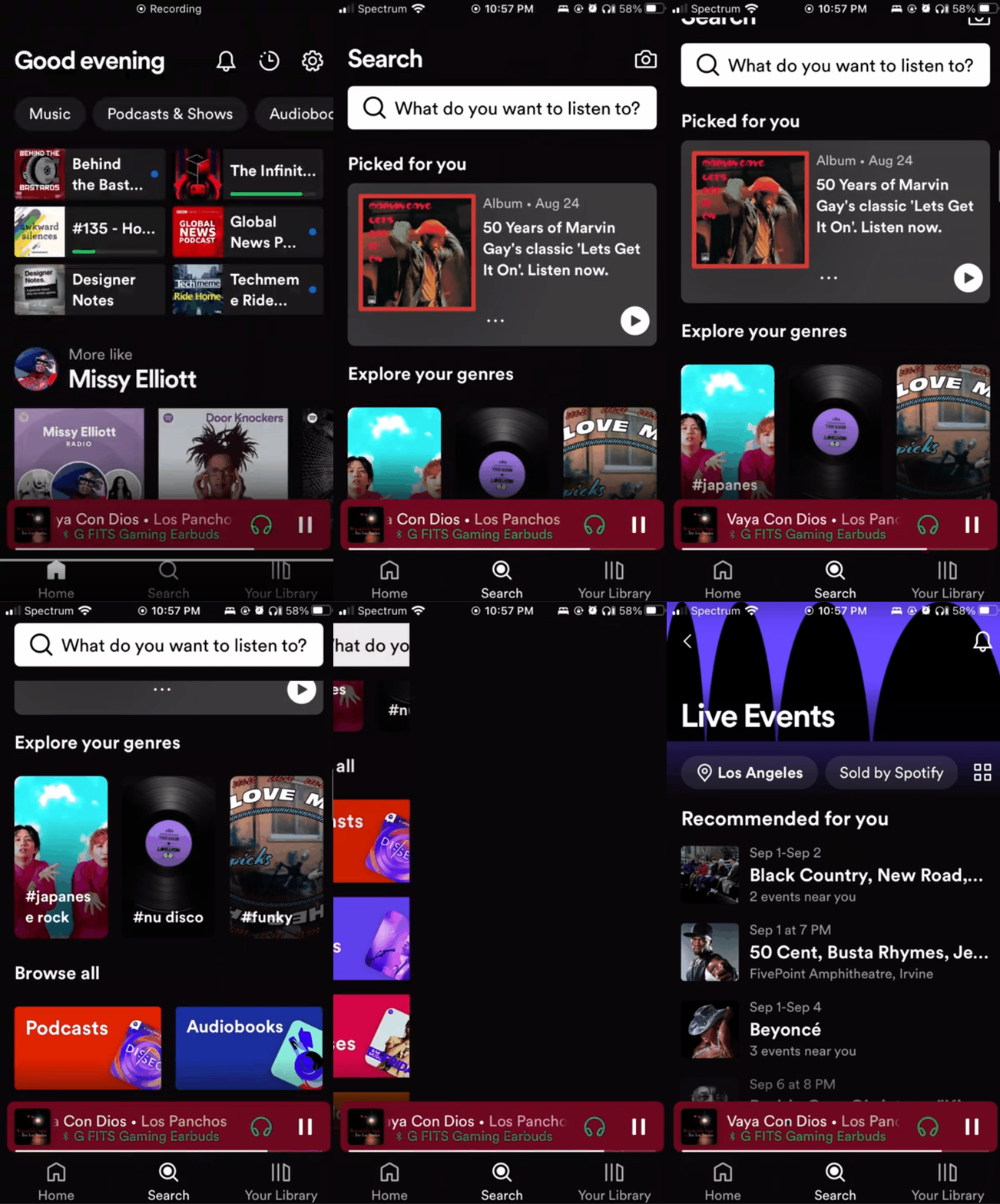
Current Flow
Users must go to Search
Find the Live Events Button
Arrive on the Live Events page
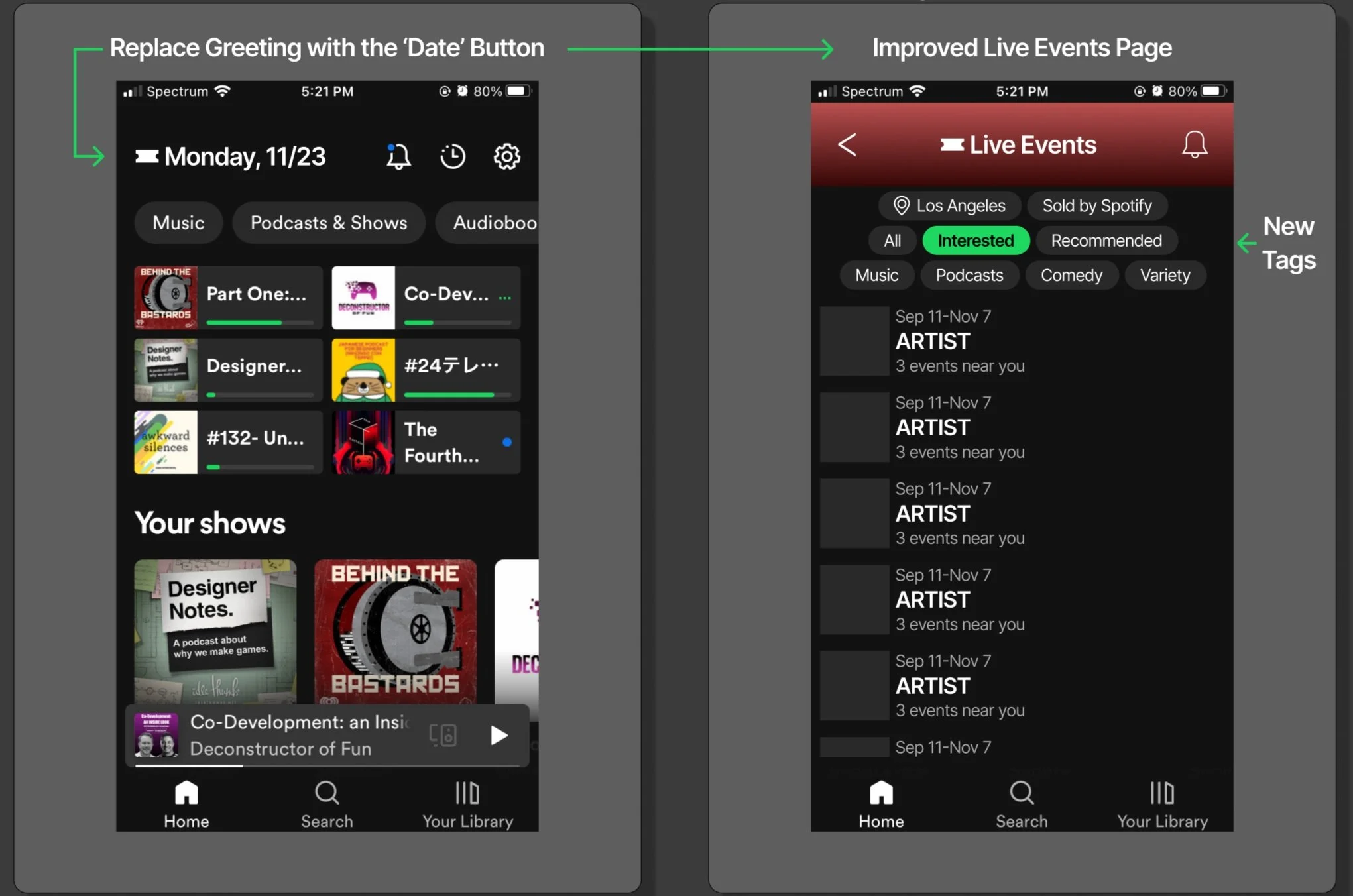
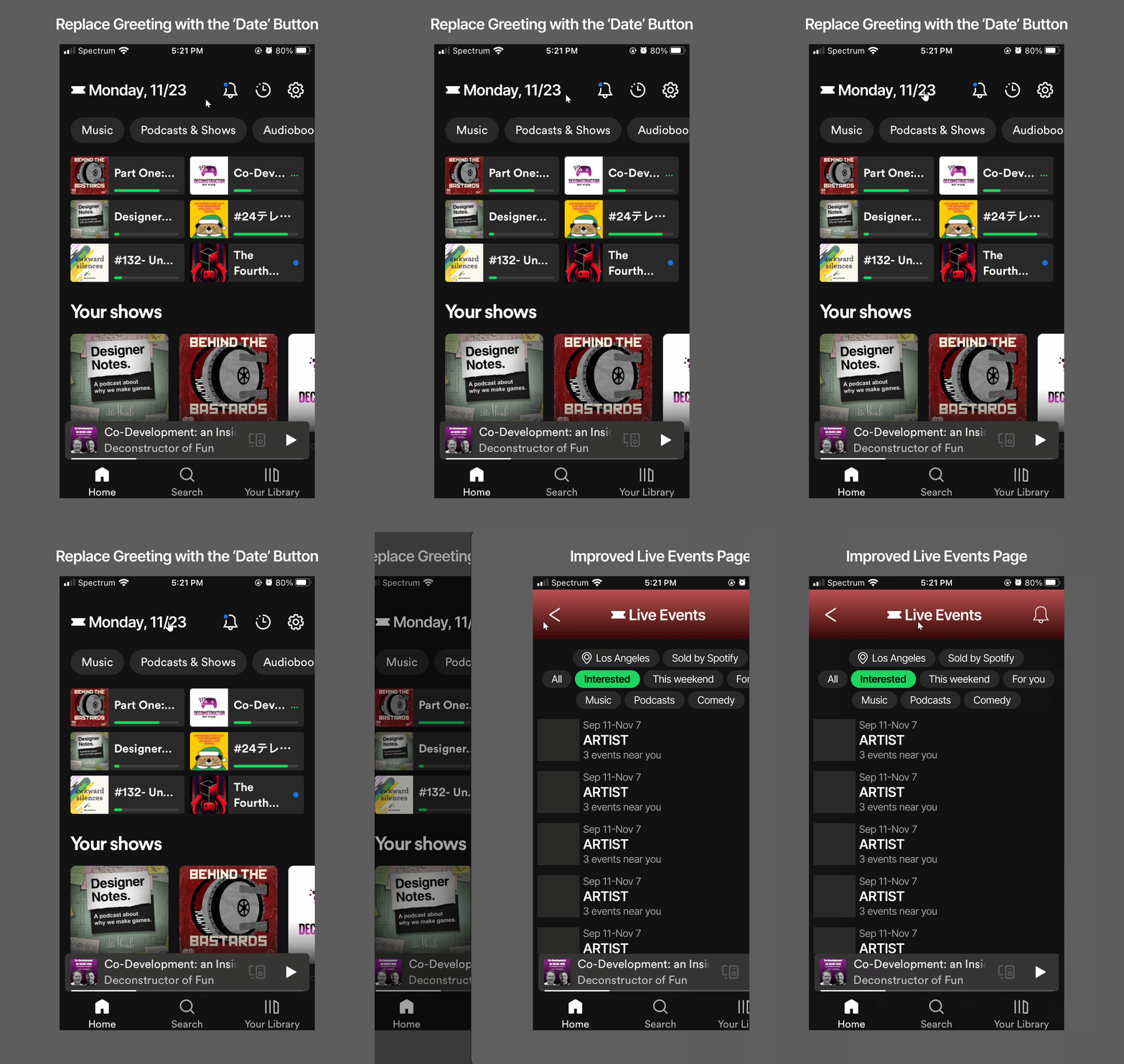
Live Events Quick Access
From the Home Click on Ticket Icon / Date
Arrive on the Live Events page
During my investigation, I found there was a lack of tags specifically for Live Events related to Comedy or Podcasts, so I modified the Live Events page to include those tags.
The goal with this exploration was to reduce the steps, as well as provide a date reminder when users opened the app. Perhaps rather than an icon and Date Text on the Home, there could be a way to show a more compact banner of the actual Event from the Live Events Page displaying the Artist Picture, and the Date.
EXPLORATION 2 - “EDIT HOME”
Preferences and Style
Using the Edit Button at the top right of the Home, users can modify their Home Preferences and alter their Home Style in the “Edit Home" menu.
Figure 2.1 - Preferences with Podcasts & Shows, and Audiobooks excluded (Left), Music Only Home (Right)
Preferences
Audio Types - where users can include or exclude types
Focus - where users can modify the Home recommendation diversity
Popularity - where users can modify the recommendation popularity to help users find content that may need some listening support!
Release Range - Users can modify to receive recommendations which are New or old, or All!
Locations - for users who want recommendations from different or specific places around the world
Below is an example of the Audio Types Podcast & Shows and Audiobooks being excluded from a Premium Members Home, and what the Home might look like with Music as the focus. Things that might change are the tags up at the top which are Genre filter buttons, based on the users listening behavior.
Style
I love a good List, but as I’ve used Tik-Tok more, and Spotify has begun to incorporate a singular swipe quick feature into the Home, and in Search - I decided to steer in that direction.
Allowing users to choose within the Style tab, we can further reduce doom scrolling aka choice paralysis, I thought this would be a dope feature to have.
Figure 2.2 - Preferences Tab to Style Tab, changing the visual Style of the Home, and returning back to the Home with a Singular (Insta-Tok Home)
In the picture above, when in the Style Tab, users can see a preview of their Home in that selected Style. Once they are done they can quickly get back to their personalized Home.
EXPLORATION 3 - FEATURE TOOLBAR
Below is the Feature Toolbar, where we can offer the users a more direct path to access Spotify’s cool features, which are often a few clicks deep and sometimes not even searchable. If a user clicks on a Feature, such as DJ Beta, they would be taken to the DJ Beta and their session would begin.
Figure 3.0 - Feature Toolbar, Editing the Toolbar, Information on the Feature, and going back to the Home with the Features
Figure 3.1 - Desktop Toolbar
Figure 3.2 - iPad Toolbar
Figure 3.3 - Roku Toolbar
EXPLORATION 4 - SAVE, EXPLORE AND CREATE CONTENT CARDS
I was inspired by iOS Home Widgets that were recently added to the operating system. I saw this system as a neat feature to have which could provide users with a more personalized feel, and be something the community could also utilize.
In this version of the Edit Home, user are able to:
Remove Content Cards generated by Spotifiy
Change Card positions
Create a Card
Explore other pre-existing Cards either made by Spotify or by other users
Figure 4.0 - From Home to Edit Home, and major interaction overview
Explore Cards
If a user wants to explore Cards generated by Spotify, created by Users, or even Artists - they can find it here.
Figure 4.1 - If a user wanted to search Widgets to put on their Home Screen, already generated by Spotify, Users, and even Artists they could find them in the Explore Cards.
Create a Card
If users want to create a card that is more accurate to their interests, they can do so here
Customize Visuals for Card
Use Tag System to Filter for specific Content
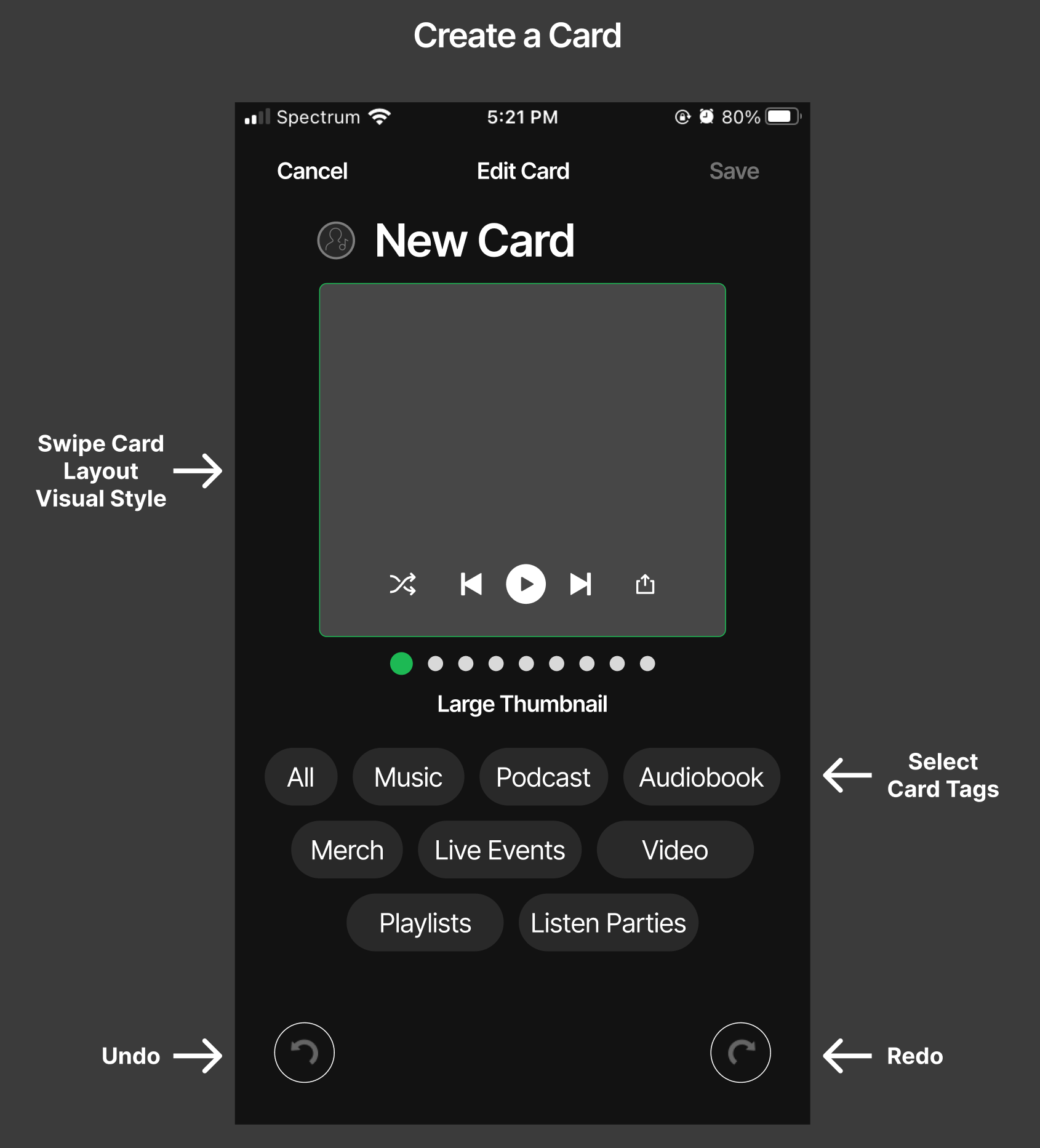
Figure 4.2 - Create a Card
Figure 4.3 - Create a Card - Visual Layout options. Users can swipe left and right to modify the visuals
Tag System
In the example below, I show the flow with the aim of generating a playlist using the Tag System:
Select Primary Tags: Music and Video, press Next
Secondary Tags appear. I select Genre
Tertiary Genre Tags appear. I select Punk and Folk, then press Next
I return back to Secondary Tags. I select Location
Tertiary Location Tags appear. I select Asia and Europe, then select Next
I return back to Secondary Tags, and Press Save
Figure 4.4 - The flow of using the Tag System to Filter for specific content
This Card is now made and Saved to my Home, and will generate the following Content:
Music and Music Videos within the Punk or Folk Genres, from Asia and Europe
PROJECT POST MORTEM
I began this project two or so months ago (Late August 2023) and since then, it’s as if Spotify has been reading my mind.
It’s since removed the Greeting from the Mobile Header, allocating more space to display more content
On the Desktop, they just added a Feature Carousel to display individual features, like Daylist that was just launched. However good Daylist is, features do not appear on any other platform and do not always appear in the Home when opened.
And soon they are rolling out a generative AI playlist tool, which might be a better way of going about discovering content in a way that feels unique to the listener in the way that I had intended Exploration 4 and it’s Tag System.
Widgets were a bad idea, but the Tag System is a salvageable exploration
During my research, I stumbled upon Smarter Playlists, a node-based playlist generation tool, made by Paul Lamere.
I think this Tag System to generate Card Content, might be better suited for a Playlist Generation Tool, similar to that of Paul’s, but within the Spotify App rather than an external site. You can watch this early demo from Paul which is worth a watch.
Looking for a UX Designer to improve your Games flow or pipeline experience?
Currently based in Los Angeles, California with work and personal experience with the various toolboxes below:
